~/jfpf / casa-3d
 Home Assistant · phone · tablet · computer
Casa 3D
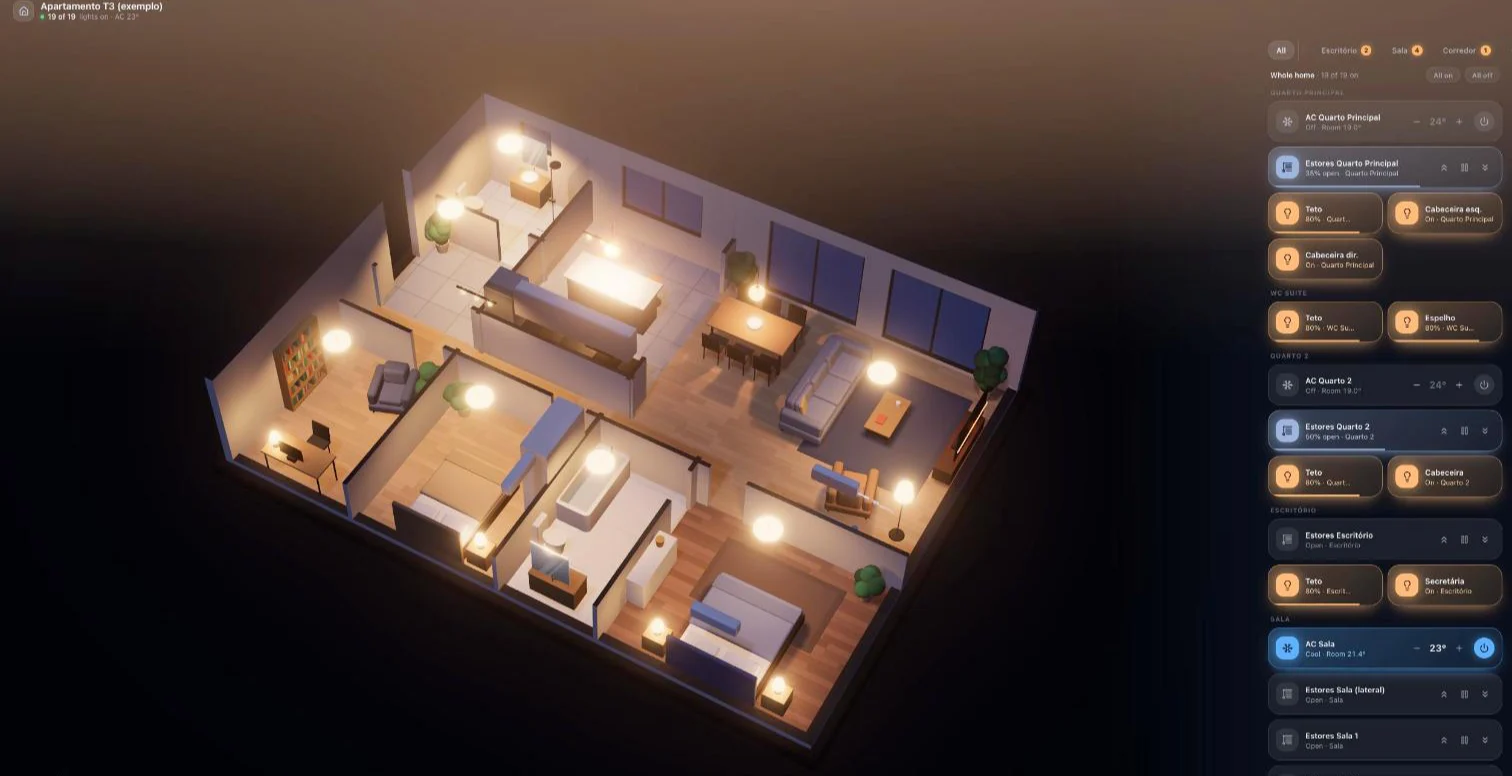
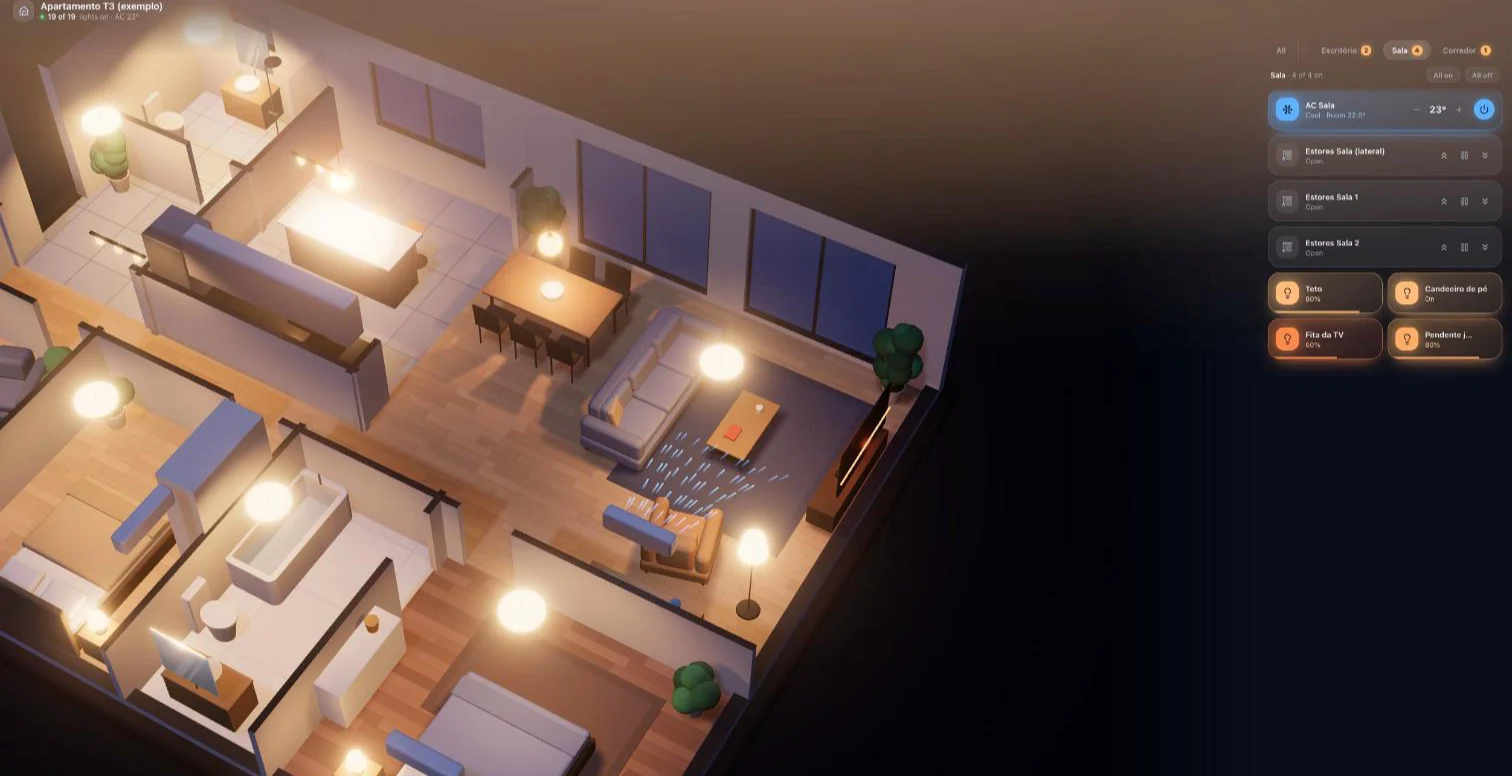
Your home as an interactive 3D model, room by room, with its furniture, lamps, blinds and air conditioning. Tap a lamp to switch it, open the blinds, set the temperature, and see the whole house at a glance. We set it all up for you.
The whole house, in your hand
No lists of switches with names nobody remembers: you see your own home, and touch what you want to change.
-
Your home, drawn to measure
Every room at its real size, with doors, windows and furniture, and every floor of the house. Turn it, zoom in, or tap a room to fly into it.
-
Lights
Tap a lamp in the model to switch it on or off, or dim the ones that dim. The lamps that are on glow in the 3D, so you see at once what was left on.
-
Blinds
Open, close or stop each blind, one room or the whole house, and see how far open each one is.
-
Air conditioning
Switch each unit on or off and set its temperature, with the room’s temperature beside it.
-
Always up to date
Switch a light at the wall, or someone else turns it on from their phone, and the model follows straight away.
-
Scenes and the sun
One tap for “Dinner”, “Cinema”, “Night” or “Away”. And the light in the model follows the real time of day, coming in from the side of the house the sun is on.
-
Phone, tablet or wall screen
It lives in the Home Assistant app on everyone’s phones, and fills a tablet on the wall or a computer screen just as well.
-
Runs in your home
Everything runs on your own Home Assistant, at home: the lights and blinds answer even when the internet is down, and nothing depends on a server of ours.
From your floor plan to your phone
Whether your home has no smart devices yet or already runs Home Assistant, we take care of the whole job.
-
01
Tell us about your home
Send us the floor plans and tell us which lights, blinds and air conditioners you want to control. We reply with a quote.
-
02
We draw it in 3D
Every room, its furniture and its lamps, facing the way your house really faces.
-
03
Installation
Your electrician fits small Shelly modules behind the switches and blinds. We set up Home Assistant, name every device and bring the 3D model to life.
-
04
Ready, with support
We test it all with you, set up the family’s phones, and keep the model up to date when something changes.
Starting from scratch
- Home Assistant GreenA small box that plugs into your router and runs the whole house.
- Shelly modulesHidden behind your existing switches and blinds, which keep working as before.
- Your air conditioningMost brands connect to Home Assistant; we check yours first.
Already on Home Assistant
- Your devices as they areLights, switches, blinds and air conditioners that Home Assistant already controls.
- A new dashboardCasa 3D is added next to your own dashboards, which stay as they are.
- Linked for youEvery lamp and blind in the model is matched to the real one.
An example apartment
A three-bedroom apartment in the evening, with all its lights on. Yours is drawn from your own floor plans.
Questions
Do I need Home Assistant?
Yes, it’s what Casa 3D runs on. If you don’t have it, we install a Home Assistant Green for you: a small box that plugs into your router. If you already have Home Assistant, we add Casa 3D to it.
Sim, é nele que o Casa 3D funciona. Se ainda não tem, instalamos um Home Assistant Green: uma pequena caixa ligada ao router. Se já tem Home Assistant, acrescentamos-lhe o Casa 3D.
Which devices work with it?
Lights, switches, blinds and air conditioners that Home Assistant can control. For new installations we use Shelly modules for the lights and blinds, fitted by an electrician behind your existing switches. For air conditioning it depends on the brand and model: tell us yours and we’ll check.
Luzes, interruptores, estores e aparelhos de ar condicionado que o Home Assistant consiga controlar. Em instalações novas usamos módulos Shelly para as luzes e os estores, colocados por um eletricista atrás dos interruptores que já tem. No ar condicionado depende da marca e do modelo: diga-nos qual é e confirmamos.
Do my wall switches still work?
Yes. The modules sit behind them, so the switches work as they always did, and the 3D model shows the change.
Sim. Os módulos ficam por trás, por isso os interruptores funcionam como sempre, e o modelo 3D mostra a mudança.
Does it need the internet?
Not at home: Home Assistant and the modules talk to each other over your own Wi-Fi, so the lights and blinds keep answering if the internet goes down.
Em casa, não: o Home Assistant e os módulos falam entre si pela sua rede Wi-Fi, por isso as luzes e os estores continuam a responder se a internet falhar.
Can I use it away from home?
Yes, with remote access for Home Assistant, for example a Home Assistant Cloud subscription in your name. We can set it up for you.
Sim, com acesso remoto ao Home Assistant, por exemplo uma subscrição Home Assistant Cloud em seu nome. Podemos configurá-la por si.
What if something changes later?
A new lamp, a moved sofa, a new room: we update the model and link the new devices while your support lasts.
Um candeeiro novo, um sofá mudado de sítio, uma divisão nova: atualizamos o modelo e ligamos os equipamentos novos enquanto durar o apoio.
What about my privacy?
Everything runs on your own Home Assistant, at home. We keep a copy of your floor plan to maintain the model. While support lasts we can reach your Home Assistant to help, only with your agreement, and you can switch that access off at any time.
Tudo funciona no seu próprio Home Assistant, em casa. Guardamos uma cópia da planta para manter o modelo. Enquanto durar o apoio podemos aceder ao seu Home Assistant para ajudar, só com o seu acordo, e pode desligar esse acesso quando quiser.
How much does it cost?
It depends on the size of the home and how many lights, blinds and air conditioners it has. Tell us about yours and we’ll send you a quote.
Depende do tamanho da casa e de quantas luzes, estores e aparelhos de ar condicionado tem. Fale-nos da sua e enviamos um orçamento.
How do I get in touch?
Use the contact form, or email support@jfpfsolutions.com. We usually reply within one business day.
Use o formulário de contacto, ou envie um email para support@jfpfsolutions.com. Normalmente respondemos num dia útil.